LicenseSim guide
Using a driving simulator as a new driver
A simulator is not a substitute for time in a real car with a qualified instructor. It is a place to learn the rules, the order of operations, and the reactions before you are responsible for a moving vehicle.
What LicenseSim is, and who it helps
It runs in your browser
An interactive 3D driving simulator that runs in a web browser — nothing to download or install.
It is built for new drivers
Made for new drivers, learner-permit holders, and anyone who wants to rehearse a specific maneuver before trying it for real.
Every lesson is a scene
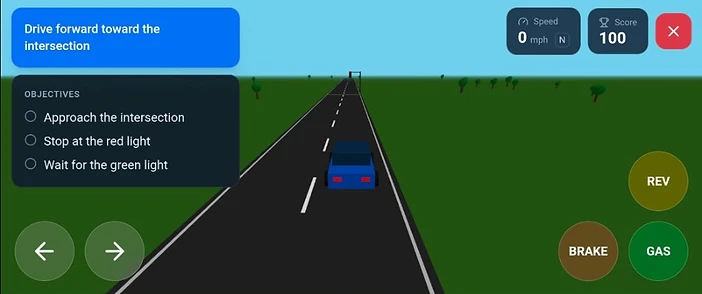
Each lesson is a driving scene with on-screen instructions, a short list of objectives, and feedback on what you did.
Nothing is scored twice
Passing a lesson saves it. Nothing you have already earned is taken away by a later attempt.
What it can teach you
The order of operations
The sequence to follow at a four-way stop, a roundabout, or an intersection with traffic lights.
Where to stop
Where to stop at a stop line, and what actually counts as a complete stop rather than a slow roll.
Which way to turn the wheel
How to steer when reversing into a space, and how to correct when the car is not lined up.
How to react in an emergency
What to do when an ambulance appears behind you, or a school bus stops with its lights flashing.
What it cannot teach you
How the pedals feel
The feel of a real clutch, brake pedal, or steering wheel.
Real-world speed
Speed judgement in a real car, on a real road.
Unpredictable drivers
How other drivers actually behave when they are not following the rules.
How the lessons are laid out
- 1Lessons are grouped Beginner, Intermediate, and Advanced, and open in order as you pass the ones before them.
- 2Each lesson opens with a short briefing, then the driving scene, then a results screen showing the mistakes you made.
- 3Passing a lesson earns XP, and XP unlocks the five cars you can take into later lessons.
- 4The Simulated Driving Test is the final lesson: a pre-test vehicle check, a three-point turn, straight-line backing, a quick stop, right-of-way, and turns.
- 5Passing the test earns the LicenseSim Virtual License and unlocks Open Drive.
The virtual license
Your LicenseSim Virtual License recognizes completion of simulator training. It does not grant legal driving privileges.
Guest access versus signing in
As a guest
You can open lessons and drive immediately, with no account at all. Progress is kept in this browser on this device.
Signed in
Your XP, completed lessons, unlocked vehicles, and attempts are saved to your account, so they follow you to another device or browser. Guest progress on this device is merged into your account when you sign in.
Devices and controls
Any modern browser
A desktop or mobile browser with 3D graphics (WebGL) enabled.
Desktop and laptop
You drive with the keyboard.
Phone and tablet
On-screen steering and pedals appear instead of the keyboard.
Landscape is best
Landscape orientation gives the best driving view. If your device does not rotate on its own, the simulator offers a control to rotate the view for you.
Related guides
Common questions
Can I use LicenseSim before I have a learner’s permit?
Yes. You can open lessons and drive as a guest with no account at all, and nothing in the simulator asks for a permit. Check your own state’s rules for what you are allowed to do in a real car.
Does the simulator count toward my required driving hours?
No. It is not a state-approved driver education course, and it does not log supervised driving hours. It is a place to learn the rules and the order of operations before you practice them for real.
How long does the whole curriculum take?
There are 18 driving activities grouped Beginner, Intermediate, and Advanced, and each one is a short scene of a few minutes. Most people work through them over several sittings.
Ready to try it?
Open the simulator and drive this yourself. No account needed — sign in later if you want your progress saved.