LicenseSim guide
Traffic signs and signals for new drivers
Signs and signals are the part of driving you can learn before you ever sit behind the wheel. LicenseSim turns each one into something you have to respond to, at the moment it appears.
Traffic lights, step by step
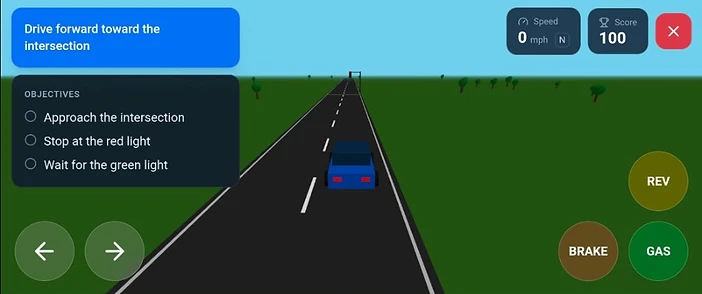
You approach an intersection on a red light. The lesson checks the whole sequence rather than just the outcome:
- 1Stop behind the white stop line — never in the crosswalk.
- 2Come to a complete stop. Rolling stops are not accepted.
- 3The light turns green only after you have stopped.
- 4Proceed once the light is green and the intersection is clear.
The signs in the Traffic Signs lesson
One course, with each sign met in turn and checked as you pass it rather than at the end:
School zone
Slow below 20 mph through the marked stretch.
Speed limit
A posted 30 mph limit that your actual speed is compared against.
Stop sign
A complete stop at the stop bar, not a slow roll.
Yield sign
Slow down and be ready to give way to traffic that has the right of way.
Roundabouts, merges, and turns
Roundabouts
The Roundabout lesson places yield signs and roundabout signs on the approach, and checks that you yield to circulating traffic before entering.
Highway merging
The Highway Merge lesson covers building speed on an on-ramp and merging into a gap in traffic.
Turns
The Turns lesson asks for a left turn and then a right turn, each from the correct lane.
Why the simulator watches your speed
LicenseSim reads your speed as you pass each sign rather than only asking whether you reached the end. That means the feedback is about what the car actually did, which is the same thing a driving examiner is watching for.
Signs and limits in LicenseSim are the simulator’s own teaching set. They are not a substitute for the traffic laws of your state or country.
Related guides
Common questions
Is the speed limit in the simulator the same as my state’s?
No. The simulator uses its own teaching set — a posted 30 mph limit and a 20 mph school zone. Real limits vary by state and by road, so always go by the signs you can actually see.
Does the simulator check my speed, or only whether I stopped?
It reads your actual speed as you pass each sign and compares it with the limit for that stretch. Stopping is checked the same way, by whether the car actually came to rest.
What is the difference between a yield sign and a stop sign?
A stop sign requires a complete stop every time. A yield sign requires you to slow down, be ready to stop, and give way to traffic that has the right of way — stopping only if you have to.
Ready to try it?
Open the simulator and drive this yourself. No account needed — sign in later if you want your progress saved.